EMPOWER TEAM COLLABORATION
Manage your pipeline without a second spreadsheet
Your opportunities are in NetSuite. Your pipeline meeting still runs from a spreadsheet because it is easier to see what needs attention there. Every change then has to find its way back into the system.
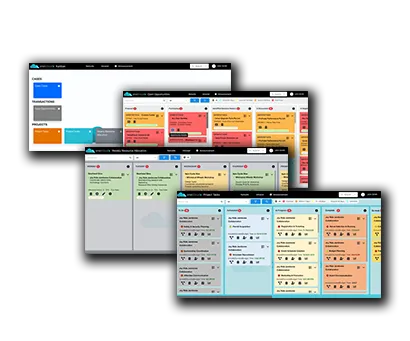
OneKloudX Kanban Boards give your team a visual working view of NetSuite records. See opportunities, cases or operational work, then drag cards between configured stages to update the underlying records. Review progress and make the next update in one place.

PRODUCTIVITY UNLEASHED
Turn a NetSuite Saved Search into a working board
Saved Searches define which records appear on the board. Cards show selected information, while columns and swimlanes organise work around your process. Configure the board for the statuses, fields and workflows your team uses.
Kanban Boards are a separately purchased OneKloudX add-on for an existing NetSuite environment. We review your records, permissions and workflow before confirming the implementation scope.


KANBAN BOARDS FOR NETSUITE
Run the sales meeting from the live pipeline
A long opportunity list can make it difficult to distinguish a deal awaiting a proposal from one that needs a decision. A sales pipeline board brings those stages into view together.
Organise opportunities into qualification, proposal, negotiation and closed stages. Review the work, agree the next action and update progress during the meeting.
Built on the NetSuite platform. It’s all done in NetSuite.
Easily understand tasks
by your team with clear, customisable boards.
Move cards between configured stages with drag-and-drop functionality.
See where work is waiting and agree the next action.
Changes made on the board are updated in NetSuite automatically.
Discuss your technical requirements with our team.
UNLOCK EFFICIENCES
Kanban Boards for every role
Make waiting work easier to find. Review support cases awaiting customer input, production handovers or project activity ready for the next team. Configure the board around the relevant NetSuite records and responsibilities.
See how FieldTech introduced a visual sales pipeline, or read how VoltX Energy configured its own boards.
WATCH KANBAN BOARDS IN ACTION
Product Demonstration
KANBAN BOARDS FOR NETSUITE CUSTOMER SUCCESSES

Since 2014, we have been using NetSuite. Before adopting Kanban Boards for NetSuite, our workflow lacked structure and was cumbersome for our users to update key information. If you can’t get people using it, you can’t get the most from it. If your data is not up to date, your reporting is inaccurate. After implementing Kanban Boards, everything changed. Now, NetSuite is our trusted, reliable source of truth.”

Implementing the OneKloudX NetSuite Kanban Boards has significantly improved how we use and manage our pipeline on a day-to-day basis. My team prefer to operate with a system that is visually easy to use and easy to distinguish. The new Kanban board is easy to use as all opportunities are in their designated swim lane, and the key deal information can be edited and updated from the card view. The ability to manage opportunities and track lab test statuses has significantly improved our internal efficiency and visibility. The outcome has not only saved us time but also empowered our teams to focus on their key sales activities. We highly recommend the OneKloudX Kanban Boards solution.
Questions about NetSuite Kanban Boards
Does dragging a card update NetSuite?
Yes. Moving a card between configured stages updates the underlying NetSuite record. The stage-to-field behaviour is set up for the workflow the board represents.
Can we choose which records and information appear?
Yes. Saved Searches determine the records shown, and the board can be configured around your fields, statuses and workflow.
Is this a separate task management application?
No. OneKloudX Kanban Boards run natively within NetSuite as a separately purchased add-on.
Explore more OneKloudX solutions: Supplier Onboarding and Eftsure & Sis ID Integration.
Discover how Kanban could work for your team
Book a discovery call to discuss the workflow you want to improve, from sales opportunities and support cases to production or project activity.
We will explore your current process, what your team needs to see and update, and how Kanban Boards could fit your NetSuite environment. We can also discuss licensing and configuration requirements.