The month-end version is familiar. Invoices arrive by email, PDF, supplier portals, and paper. Someone keys them into the ERP, someone else chases approvals, and the finance team spends too much of its time finding exceptions instead of managing cash, suppliers, and risk.
For a mid-market business in Australia or New Zealand, that invoice pile is rarely just an admin problem. It slows close, weakens spend visibility, creates avoidable errors, and leaves too much of the process dependent on individual staff members remembering who needs to approve what. When the business is running Oracle NetSuite, Epicor Kinetic, or MYOB Acumatica, the frustration is sharper because the ERP should be the system of record, but AP often still lives in inboxes and spreadsheets.
The End of the Invoice Pile
Manual AP breaks down in predictable ways. Supplier invoices sit unread in shared mailboxes. Coding varies by person. GST checks happen late. Approval routing depends on tribal knowledge. By the time the team gets to reconciliation, they’re fixing preventable issues instead of closing cleanly.
The broader market tells you this isn’t a niche improvement project anymore. The global accounts payable automation market is projected to reach approximately USD $6.17 billion in 2025, and more than 80% of finance leaders globally identify accelerating AP automation as a key part of digital transformation, according to accounts payable automation statistics. That matters because it signals where finance operating models are heading, not just where software vendors want them to go.
What finance leaders usually miss
The visible problem is data entry. The hidden problem is process control.
When invoices move manually, the business pays in several ways at once:
- Time cost: AP staff spend hours on capture, chasing, rekeying, and exception handling.
- Cash control risk: approvals arrive late, payment runs become reactive, and treasury loses a clear view of upcoming liabilities.
- Compliance exposure: GST treatment, audit trails, and approval evidence become harder to prove when the process lives across email chains and spreadsheets.
- Single-point dependency: one experienced team member often holds the process together.
A useful place to start is to reduce manual data entry, because data capture is usually the first operational bottleneck finance teams can remove without redesigning every upstream process on day one.
Manual AP doesn’t fail all at once. It fails in small delays and small errors that finance teams absorb every month.
For organisations already reviewing broader finance transformation, AP automation sits naturally inside the same conversation as ERP clean-up, workflow design, and reporting discipline. That’s why it often belongs in a wider digital transformation in finance strategy, not as a standalone point solution.
Mapping the Modern AP Workflow
Most CFOs don’t need another definition of accounts payable automation. They need to see where the manual friction disappears, and where exceptions still need human judgement.
In Australian mid-market organisations, AP automation integrated with ERPs like Oracle NetSuite achieves straight-through processing rates of 85 to 95% for invoice handling, cutting cycle times from 10 to 15 days in manual processes to under 2 days. The point isn’t that every invoice becomes touchless. The point is that routine invoices stop consuming skilled finance capacity.
Manual vs automated accounts payable workflow
| Stage | Manual Process (The Old Way) | Automated Process (The New Way) |
|---|---|---|
| Invoice receipt | AP monitors multiple inboxes and downloads attachments manually | Invoices are captured from email, upload, portal, or scanner into a single intake flow |
| Data capture | Staff key invoice number, supplier, date, GST, line items, and totals by hand | AI-powered OCR extracts fields and prepares data for validation |
| Validation | AP officer checks master data, totals, tax treatment, and duplicates manually | Rules validate supplier details, totals, GST logic, and duplicate indicators before posting |
| Matching | Team compares invoice to PO and receipt across separate records | Automated 3-way matching checks invoice, PO, and goods receipt in workflow |
| Approval routing | AP chases managers by email and phone | Rules-based workflow routes approvals by entity, amount, supplier, or cost centre |
| Posting to ERP | Staff re-enter approved data into the ERP | Approved invoices sync directly into the ERP with audit history attached |
| Payment preparation | Payment runs rely on manual review and spreadsheet checks | Approved invoices flow into scheduled payment controls with cleaner due-date visibility |
| Audit support | Finance gathers email evidence and screenshots later | Audit trail is captured during the transaction lifecycle |
What the technology actually does
The first layer is capture. Tools such as Medius, Zudello, Lightyear, ZoneCapture, and ProSpend are designed to ingest invoices from different channels and standardise them into one process. If the invoice is poorly formatted, OCR does the first pass. If supplier layouts vary, machine learning improves recognition over time, but rules still matter more than marketing claims.
The second layer is validation and matching. At this stage, AP automation starts paying for itself. The platform checks whether the supplier exists, whether GST looks right, whether the invoice appears to be a duplicate, and whether there is a corresponding purchase order and receipt. In manufacturing and distribution, this matters because receipt timing, part substitutions, freight charges, and split deliveries often create the exceptions that manual AP teams spend all day untangling.
Where CFOs should focus
The critical design question isn’t “Can it read invoices?” Nearly every serious platform can. The essential questions are:
- How does it handle exceptions: PO variance, duplicate risk, freight, partial receipts, or tax coding anomalies?
- How does it connect to the ERP: native transaction sync is usually safer than exporting files and re-importing them.
- Can the workflow reflect your operating model: multi-entity approvals, delegated authority, and local tax treatment all need to work inside the process.
For organisations that also want stronger bank-side visibility, AP workflow design is often more useful when paired with cleaner cash data and ANZ bank feeds integration, because invoice approval speed and payment timing need to line up with treasury discipline.
Practical rule: Automate the standard path first. Design human review for the exceptions that affect cash, tax, or supplier trust.
Quantifying the Business Case for Automation
A business case for accounts payable automation shouldn’t rely on generic “efficiency gains”. A CFO needs a short list of measurable outcomes tied to invoice cost, processing speed, close quality, and finance capacity.
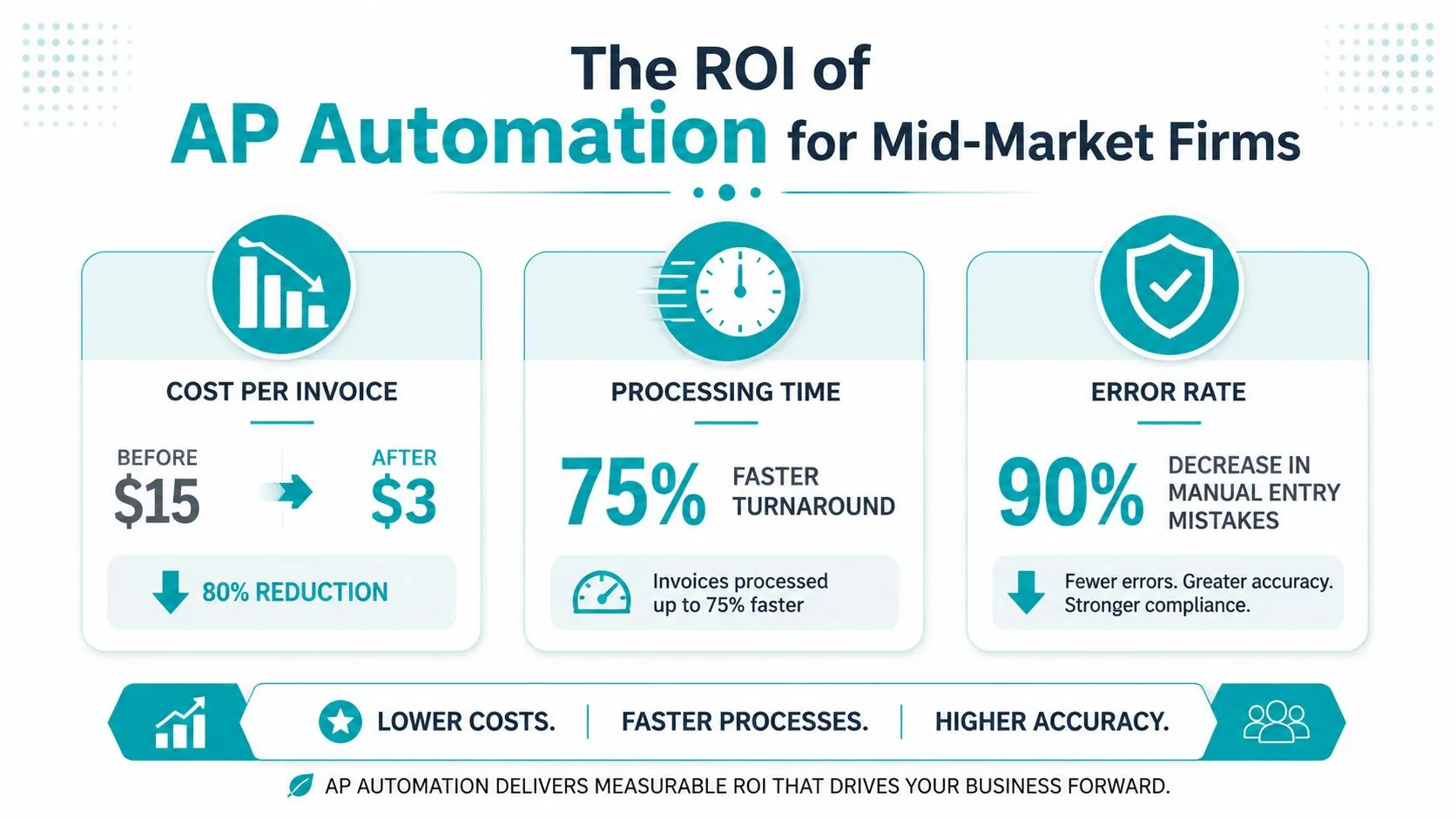
Benchmark data from Medius AU-focused studies says AP automation in New Zealand and Australian growth-stage businesses cuts invoice processing costs by 60 to 80%, from AU$12 to AU$18 per invoice manually to AU$2 to AU$4 automated, delivering 40% ROI in year one, according to AU and NZ AP automation benchmarks. Those are the numbers that tend to secure budget because they link process redesign directly to operating cost.
Where the return actually comes from
Invoice cost reduction is only one part of the story. The stronger business case usually combines several effects at once.
- Lower handling cost: less manual capture, fewer email follow-ups, and fewer rework cycles.
- Cleaner approvals: workflow reduces waiting time between receipt and sign-off.
- Better exception discipline: the team spends its time on mismatches and risk, not routine coding.
- Faster close support: approved and validated invoices hit the ERP with better consistency.
In practice, finance leaders should expect the biggest gains where AP volume is spread across many suppliers, entities, approvers, and invoice formats. That’s common in wholesale distribution, field services, manufacturing, and multi-site operations.
Metrics worth tracking from day one
If a project team can’t name the post-go-live metrics, the implementation usually drifts into software configuration rather than process improvement.
A practical scorecard includes:
- Cost per invoice, because it shows whether the manual handling burden is dropping.
- Touchless or straight-through rate, because it reveals how much of the volume follows the standard path.
- Approval cycle time, because approval lag is often a bigger problem than data capture.
- Month-end impact, especially whether AP is still posting late adjustments after the close window starts.
- Exception profile, grouped by duplicate risk, missing PO, receipt mismatch, tax issue, and supplier master data issue.
If you can’t measure exceptions by type, you’ll keep blaming the software for upstream process problems.
There is also a strategic benefit many businesses understate. Once AP data arrives in the ERP in a structured, timely way, the broader finance model improves. Forecasting gets cleaner. Accruals become easier to defend. Procurement teams can see supplier behaviour earlier. The value isn’t only in AP labour saved, it’s in the quality of downstream decisions.
That is one reason AP automation should be assessed as part of the wider benefits of an ERP conversation. When the ERP becomes the trusted source of liabilities and approvals, finance spends less time reconstructing reality after the fact.
Choosing Your AP Automation Technology
Selecting the tool is where many projects go off track. Buyers often compare invoice capture features and overlook the harder issue, which is whether the platform will fit the ERP, operating model, and compliance obligations already in place.
For most mid-market ANZ businesses, the shortlist starts with the ERP. Oracle NetSuite, Epicor Kinetic, and MYOB Acumatica each support AP modernisation well, but the implementation shape changes depending on how purchasing, inventory, approvals, and entities are configured. A business with PO-heavy manufacturing will evaluate differently from a services group with expense-heavy invoice flows.
What to assess before you buy
The strongest selection process usually focuses on five areas.
ERP integration depth
You want more than a basic connector. The system should post cleanly into the right supplier records, approval states, tax logic, and dimensions used by finance. If integration relies on too many custom workarounds, the AP project becomes fragile from the start.
Workflow control
Look closely at approval logic. Can it handle entity-specific delegations, out-of-office approvals, threshold changes, and substitutions? In ANZ groups with multiple business units, this tends to matter more than dashboard polish.
Local tax and compliance fit
GST treatment, invoice evidence, and e-invoicing readiness must be addressed during evaluation, not after signing. If the platform treats local compliance as an add-on problem, the finance team will end up building manual controls around an “automated” process.
Exception handling
Request demonstrations using real examples from your business. Use invoices with price variance, freight line items, partial receipts, missing POs, and supplier formatting issues. Smooth demo data hides weak exception design.
Ecosystem compatibility
AP doesn’t live alone. The better question is whether it fits your broader stack. That can include Workato, Celigo, Boomi, or Jitterbit for integration orchestration, plus finance and spend tools such as Medius, Zudello, Lightyear, ProSpend, Expensify, Webexpenses, Coupa, BlackLine, Kyriba, Zone & Co, Avalara, and Strongpoint.
Platforms and partner fit matter
A practical selection exercise often lands on a small set of combinations rather than a single product category. For example, a NetSuite client might look at Zone & Co or Medius, while a distribution business running Acumatica may care more about how invoice approvals align with purchasing and warehouse events. An Epicor Kinetic environment may need tighter coordination with operational data and receipt timing before AP can become touchless.
OneKloudX works across Oracle NetSuite, Epicor Kinetic, and MYOB Acumatica, and that matters because AP automation decisions are rarely just software procurement decisions. They involve architecture, approval design, master data, and integration choices across the finance estate.
The best AP tool on paper still underdelivers if it doesn’t match how your ERP, purchasing process, and approval authority already work.
Your Implementation and Change Management Roadmap
Software doesn’t rescue a weak AP process. That is why so many projects look fine during demos and struggle after go-live.
Global surveys report that only 9% of AP departments are fully automated, and AU businesses face unique hurdles with ATO compliance, often leading to 20 to 30% higher implementation failure rates in multi-entity setups without specialist partners, according to accounts payable automation trends and risks. The practical lesson is simple. AP automation projects fail less from lack of features and more from weak design, poor exception mapping, and inadequate change management.
Start with process, not screens
A sound implementation begins by mapping the actual invoice journey rather than the policy version. This involves identifying who receives invoices, who codes them, who resolves matching issues, who can override approvals, and where supporting evidence is stored. In many businesses, the actual process differs materially from documented procedure.
That discovery phase should also separate invoice types. PO-backed supplier invoices, non-PO overhead invoices, intercompany charges, freight invoices, utilities, and employee reimbursements don’t all belong in the same workflow. Teams that force them into one generic path usually create more exceptions than they remove.
Build around three workstreams
A practical roadmap usually works best when project leaders run three streams in parallel:
- Process design: define intake channels, matching rules, approval flows, exception queues, and posting logic.
- Data readiness: clean supplier records, tax settings, approval hierarchies, PO usage discipline, and entity structures.
- People adoption: train AP staff, approvers, procurement, and finance controllers on what changes, what doesn’t, and how exceptions should be handled.
Methodology matters in this context. An architecture-led approach, including structured discovery and controlled delivery, reduces the risk of automating bad habits. In my experience, finance teams adopt AP automation well when the project removes administrative pain without taking away accountability. They resist it when the design is opaque or when approval owners think they’re losing control.
What works and what doesn’t
What works
- Approval matrices defined before configuration starts
- Real supplier invoices used during design workshops
- Explicit exception owners
- A staged rollout by invoice type or entity
- Finance and operations both involved in sign-off
What doesn’t
- Treating AP automation as an IT-only project
- Assuming every supplier invoice should be PO matched
- Leaving supplier master data cleanup until the end
- Training approvers only after workflow goes live
- Measuring success only by “system live” rather than process outcomes
Operational advice: If approvers still use email to approve after go-live, the workflow hasn’t been implemented properly. It’s only been documented.
Navigating Australian Compliance and Risk
Many AP projects are sold as productivity initiatives. In ANZ, they are also compliance design projects.
For fast-growing multi-entity organisations, 65% of finance leaders cite compliance as the top blocker to automation, driven by challenges such as data residency under the Privacy Act 1988 and real-time BAS reporting requirements, according to touchless AP compliance considerations. That should change how finance leaders evaluate risk. The question isn’t only whether the system can automate invoices. It’s whether it can automate them in a way that stands up to audit, tax review, and internal control expectations.
The local issues generic AP content skips
Australian and New Zealand businesses need to think beyond OCR accuracy and approval speed.
- Data sovereignty: where invoice data, supplier records, and approval history are stored matters, particularly for groups with internal governance requirements around residency and access.
- GST handling: coding logic must reflect the way the business treats GST across entities, invoice types, and exceptions.
- BAS readiness: AP data quality affects reporting quality. If invoices are coded inconsistently or approved late, BAS processes become more manual.
- E-invoicing and evidence trails: the solution should preserve transaction history in a way that supports audit and future process maturity.
Risk control should be designed in
A strong AP automation design creates control points without slowing the process unnecessarily. That usually means separating routine invoices from review-heavy transactions, restricting override permissions, and ensuring the ERP remains the trusted source for approved liability data.
For CFOs, a useful challenge is this. If an auditor asked your team to reconstruct why an invoice was approved, coded, and paid, could the system show the full trail without relying on inboxes and memory? If the answer is no, the AP process isn’t modernised yet, even if invoice capture has improved.
The safest approach is to treat compliance requirements as core solution criteria during discovery, especially when the business operates across entities, regions, or approval structures.
Defining Your Path to AP Modernisation
The next step doesn’t need to be a software purchase. It should be a decision process.
Start with a current-state audit. Map invoice sources, approval points, exception types, ERP touchpoints, and tax control requirements. Most finance teams already know where the friction is, but documenting it properly changes the conversation from “we need better AP software” to “we need a process that can scale”.
Then define success in operational terms. Decide what good looks like for your business. That may be cleaner PO matching, fewer manual touches on non-PO invoices, faster approval turnaround, tighter audit evidence, or better visibility across entities. Keep the measures relevant to how your finance team works.
A third step is partner evaluation. Compare tools and implementation approaches against your ERP, your industry workflow, and your compliance reality. Generic checklists won’t do much for a manufacturer dealing with receipts and supplier variances, or for a multi-entity group balancing approval governance and local tax treatment.
The businesses that get this right usually don’t chase the flashiest demo. They choose a workable operating model, connect it properly to the ERP, and put governance around the exceptions that matter.
If your finance team is still carrying AP through inboxes, spreadsheets, and manual approvals, OneKloudX can help you assess the current process, define the right architecture around NetSuite, Epicor Kinetic, or MYOB Acumatica, and plan an implementation path that fits ANZ compliance and operational reality.
Connect with us today and get started.