Most finance leaders don’t start looking at professional services automation because they love software. They start because the monthly numbers don’t line up fast enough, project managers are running separate spreadsheets, and billing still depends on someone chasing timesheets on Friday afternoon.
That operating model holds for a while. Then growth makes the cracks expensive. WIP sits unreviewed, utilisation is argued over instead of measured, and forecast accuracy depends more on individual discipline than system control. In Australian and New Zealand firms, that usually shows up as margin pressure, delayed invoicing, and too much rework between delivery teams and finance.
Moving Beyond Spreadsheets in Professional Services
A typical mid-market services business already has tools. CRM might sit in HubSpot or Salesforce. Finance might run in Oracle NetSuite, Epicor Kinetic, or MYOB Acumatica. Delivery teams often still manage the work itself in spreadsheets, lightweight task tools, or email chains.
That split causes more damage than many teams realise. Quotes don’t flow cleanly into project plans. Resource allocations drift away from what was sold. Time capture arrives late. Finance gets partial information, then spends days cleaning it before invoices go out.
What the spreadsheet model gets wrong
Spreadsheets aren’t the problem. The actual problem is that each team creates its own version of operational truth.
A project director might think a job is on track because milestones are green. The CFO sees margin slipping because unbilled time and scope changes haven’t been captured properly. Both can be technically right, and the business still loses money.
Common signs you’ve outgrown the patchwork approach include:
- Forecasts that move too much: pipeline, staffing, and delivery plans aren’t connected.
- Billing delays: approved time, expenses, and contract terms sit in different systems.
- Weak utilisation visibility: leaders can’t see who is billable, available, or overloaded.
- Late margin reporting: by the time project profitability is clear, the job is already in trouble.
Professional services automation fixes that by changing the operating model, not just adding another app. It brings project management, resourcing, time tracking, billing, and reporting into one flow.
Practical rule: if your month-end depends on merging exports from multiple systems, you don’t have a workflow problem, you have an architecture problem.
Why this shift is now mainstream
The direction of travel is clear. The global professional services automation market is projected to grow from US$15.0 billion in 2026 to US$32.5 billion by 2033 at an 11.7% CAGR, with cloud deployment holding 62% market share in 2025, according to Persistence Market Research’s PSA market outlook.
For ANZ firms, that matters because cloud-first operating models suit distributed teams, multi-entity reporting, and tighter control over delivery data. If you want a broader automation lens beyond PSA itself, this guide to automating tasks for business professionals is useful because it shows how manual work tends to spread across knowledge-based businesses before leaders standardise processes.
What Professional Services Automation Actually Does
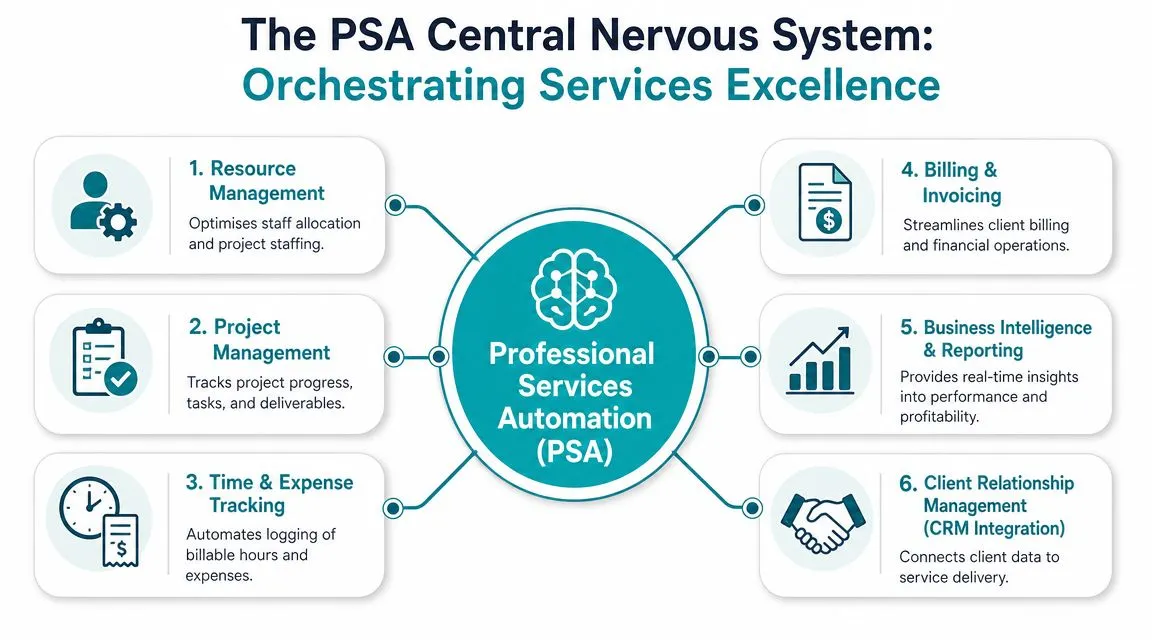
The simplest way to think about professional services automation is this. It acts like the central nervous system for a services business. Sales hands over work, delivery executes it, finance bills it, leadership reports on it. PSA connects those signals so each team isn’t operating blind.
The technical value isn’t in any one feature. It comes from unifying project delivery, resourcing, time capture, billing, and reporting in one operational model, which is why managers can monitor utilisation and project margin in near real time instead of waiting for manual reconciliations, as described in Forecast’s explanation of PSA architecture.
The five functions that matter most
Project and portfolio control
Work becomes structured. Projects, milestones, dependencies, budgets, and change requests sit in one place.
For an engineering consultancy delivering work across Sydney, Melbourne, and Auckland, that means leaders can see whether a project is still aligned to scope before it reaches invoicing. Without that structure, project status often becomes a meeting ritual instead of a financial control.
Resource management
This is usually where the margin story starts. Good PSA helps allocate the right people to the right work based on skills, availability, and project timing.
In practice, that means fewer situations where senior staff are buried in work junior staff could handle, or where a team is overcommitted because pipeline assumptions never made it into the delivery plan. Firms that want to sharpen this discipline can also look at resource allocation for project-based and service businesses as a planning model.
Time and expense capture
This sounds administrative. It isn’t. It’s the point where work either becomes recoverable revenue or disappears.
If consultants submit time late, or if reimbursable expenses are detached from the project record, finance inherits a clean-up task and the business absorbs avoidable leakage. The best PSA setups make capture part of the delivery workflow, not an afterthought.
Billing, reporting, and the single source of truth
Billing should not require finance to reinterpret what operations meant. In a solid PSA model, approved time, expenses, contract rules, and project progress feed invoicing directly.
Reporting then becomes operational, not forensic. Leaders can review:
- Utilisation trends, by person, team, or service line
- Billable versus non-billable effort, without manual manipulation
- Project margin, while there’s still time to correct delivery
- Forecast position, based on live delivery and resource data
When time, delivery, and billing data share the same structure, the CFO stops arguing with operations about whose spreadsheet is right.
That’s the promise of professional services automation. One data model, fewer handoffs, faster decisions.
PSA vs ERP vs CRM: Where It Fits in Your Architecture
Many buyers get stuck on the wrong question. They ask whether PSA replaces ERP or CRM. It doesn’t. Each system has a different job.
CRM manages demand. ERP manages the financial and operational backbone. PSA manages service delivery from commitment to cash. The problem isn’t overlap. The problem is poor system boundaries.
The job each system should do
| System | Primary Focus | Core Data | Main Users |
|---|---|---|---|
| CRM | Lead-to-opportunity and account management | prospects, contacts, pipeline, activities | sales, account managers, marketing |
| PSA | Quote-to-cash for services delivery | projects, resources, time, expenses, delivery status, billing events | project managers, services leaders, consultants, finance |
| ERP | Core business operations and financial control | general ledger, AP, AR, purchasing, inventory, entities, compliance records | finance, operations, procurement, executives |
A clean architecture matters most when the business runs more than simple consulting. Many ANZ firms mix service revenue with inventory, field work, support retainers, or multi-entity finance. In that environment, a key design issue is duplicate data. Comidor’s discussion of PSA in broader enterprise architecture captures this well, especially for organisations trying to support compliance and service-to-cash workflows without creating more silos.
What good integration looks like
A practical architecture usually follows this pattern:
- CRM owns customer and opportunity data
- PSA owns project execution, resource planning, and time capture
- ERP owns billing outcomes, financial controls, revenue treatment, and entity reporting
That doesn’t mean every workflow must jump across three systems for every action. It means each record has a system of record, and integrations move only the data that needs to move.
For example:
- A deal is won in Salesforce or HubSpot
- The project is created in the PSA layer with scope, schedule, and staffing assumptions
- Approved billing events, invoices, and financial postings flow to NetSuite, Epicor Kinetic, or MYOB Acumatica
- Automation platforms such as Workato, Celigo, Boomi, or Jitterbit handle orchestration where native integration isn’t enough
Where firms usually go wrong
Most integration failures aren’t technical. They come from weak operating decisions.
Architecture test: if two systems both allow users to edit the same commercial or financial field, expect reconciliation pain later.
A services business using NetSuite as its financial backbone, for instance, may still need a dedicated PSA capability for delivery discipline. The important step is mapping ownership properly, as shown in this NetSuite professional services view. That avoids the common ANZ pattern where project teams, finance, and sales each maintain their own version of the job.
Key Benefits and Measuring ROI for Australian Businesses
Most PSA business cases fail because they stay too generic. Better visibility isn’t enough. Faster reporting isn’t enough. A CFO needs to know which numbers should move, where leakage sits today, and how the operating model will improve margin discipline.
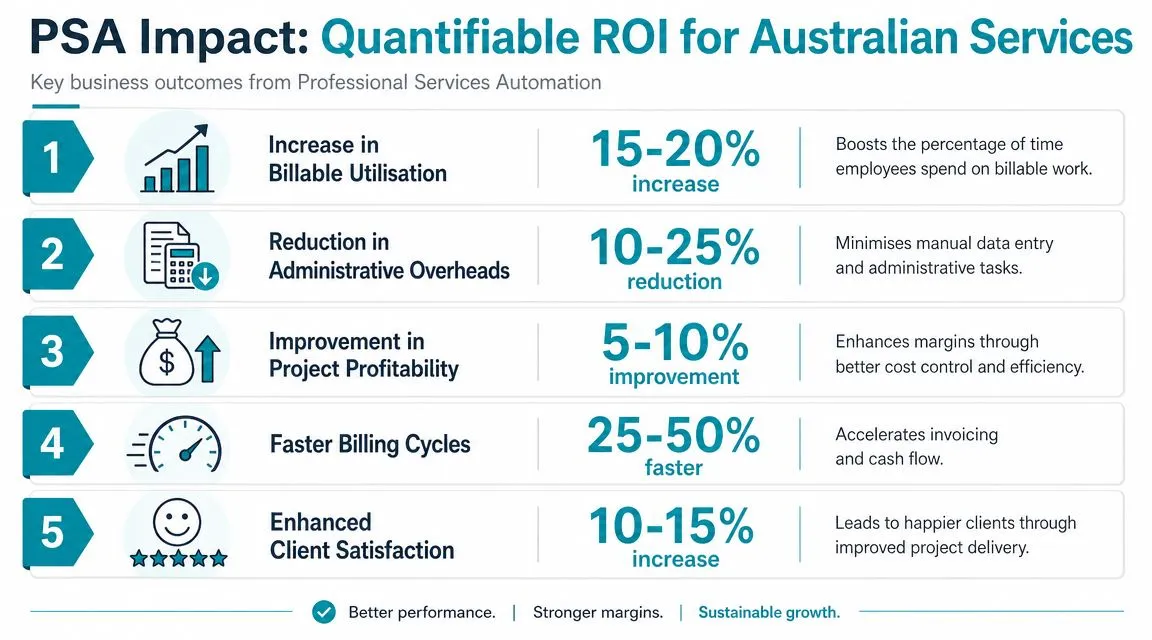
The strongest benchmark data available points to profitability, not just convenience. Organisations using PSA achieve 12% higher EBITDA on average, and the 2024 Consultancy BenchPress survey found PSA users had 19% higher gross margins than firms relying on spreadsheets, according to CMap’s PSA guide referencing Service Performance Insight research.
The finance outcomes that matter
For ANZ firms, ROI usually shows up in a handful of operational levers:
- Billable utilisation discipline: leaders can distinguish capacity from actual productive deployment.
- Project margin control: delivery teams see budget drift earlier, before write-downs become inevitable.
- Billing accuracy: approved time, expenses, and contract terms line up more cleanly.
- Forecast reliability: pipeline, staffing, and active delivery stop living in separate planning worlds.
- Governance: finance gets clearer evidence trails for project costs, invoicing, and revenue-related reporting.
A consulting firm serving both Australian and New Zealand clients, for example, may need multi-currency billing, stronger control over project labour costs, and entity-level financial reporting. PSA adds the most value when it sits inside a broader process design rather than being used as a standalone scheduling tool.
Build an ROI model around local metrics
The board usually doesn’t care whether users like the new interface. It cares whether project economics are becoming more predictable.
That’s why a practical ROI model should start with baseline measures such as:
- Billable utilisation
- Project margin leakage
- Forecast accuracy
- WIP ageing
- Days to invoice after work is completed
- Rework between delivery and finance
For firms reviewing costing discipline in detail, managing complex project costing and budget control is a useful reference point because it frames PSA value in the language finance teams already use.
If your business case can’t name the margin leaks you expect PSA to fix, you’re still buying features, not an operating model.
Selecting the Right PSA Strategy for Your Firm
The decision isn’t just which product to buy. It’s which architecture your business can run well over time. In the mid-market, three patterns show up repeatedly, and each has trade-offs.
Option one: native PSA within ERP
This approach suits firms that want tighter financial control and fewer moving parts. If your business already runs heavily through Oracle NetSuite, Epicor Kinetic, or MYOB Acumatica, keeping more services processes close to the ERP layer can simplify governance.
The upside is cleaner financial alignment. The trade-off is that some teams may want delivery features that go deeper than the native stack provides.
Option two: standalone PSA integrated with ERP
This works well when service delivery complexity is high, or when the business already has an ERP platform it doesn’t want to disrupt. A specialist PSA can give project teams better resourcing, scheduling, and delivery control while the ERP remains the financial system of record.
This pattern succeeds only when integrations are designed carefully. Customer master data, project structures, billing triggers, and financial outputs need clear ownership. If that design is weak, the business ends up with duplicate maintenance and disputed reports.
Option three: composable architecture
Some firms need a more modular setup. They may run Salesforce or HubSpot for CRM, use specialised expense tools such as Webexpenses, Expensify, or ProSpend, automate AP through Medius, Zudello, or Lightyear, and connect workflows through Workato, Celigo, Boomi, or Jitterbit.
This can be the right answer when the business model is mixed, especially if services sit alongside distribution, inventory, or field operations. It does, however, demand discipline. Composable doesn’t mean uncontrolled.
How to choose without overbuying
A good selection process starts with business shape, not vendor demos. Ask:
- Where does margin leak today? resourcing, time capture, scope control, or billing?
- How complex is the entity structure? especially across Australia and New Zealand.
- Does services delivery sit alone, or alongside inventory, procurement, or manufacturing?
- Who needs the better user experience most? project managers, consultants, finance, or executives.
- What should remain the financial source of truth?
The more useful lens is ROI proof, not feature count. Upland’s perspective on building a local PSA ROI framework is relevant here because it shifts the discussion toward billable utilisation, project margin leakage, and forecast accuracy, which is where ANZ firms usually feel the pressure first.
OneKloudX works in this architecture-led space across Oracle NetSuite, Epicor Kinetic, and MYOB Acumatica, and the practical value of that approach is straightforward. The right PSA strategy depends on whether your services process should sit inside ERP, beside it, or be orchestrated across connected systems.
A Practical Roadmap for PSA Implementation
Most PSA projects don’t fail because the software can’t do the job. They fail because the business automates a messy process, migrates poor data, or leaves change management until the end.
A better implementation path is phased and operational. It should reduce risk at each step.
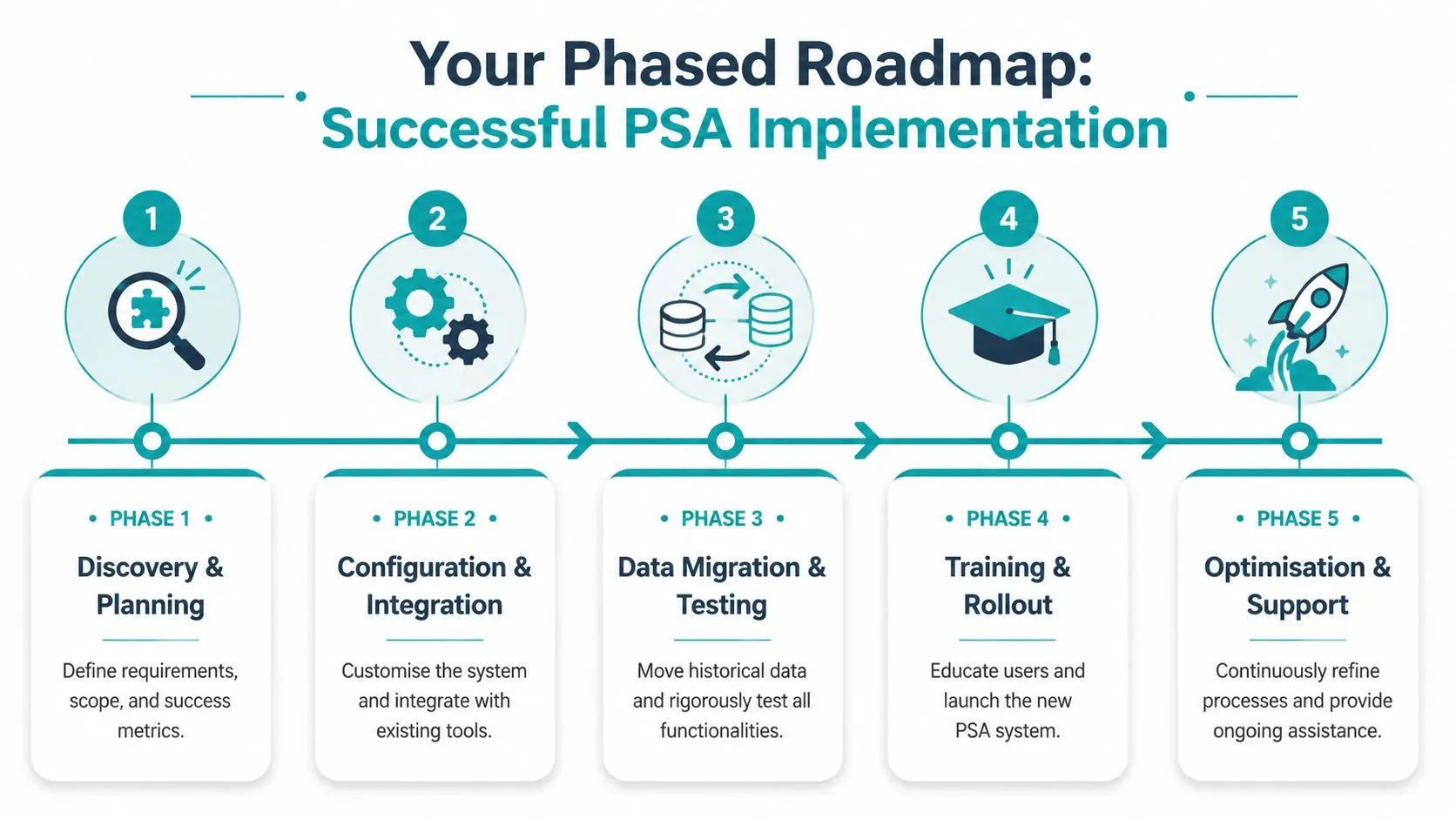
Phase one and two:
Discovery and planning
Start with business rules, not screens. Define how jobs are sold, staffed, delivered, approved, billed, and reported. Identify where data should be entered once and reused downstream.
This is also where success measures need to be agreed. If finance wants tighter project profitability reporting but delivery wants easier time capture, both goals must appear in the design.
Configuration and integration
Configure the workflow around the agreed process. Then connect it properly.
A practical ANZ example is a services firm using NetSuite for finance and wanting approved project data to feed invoicing and revenue-related processes more consistently. Another is a project-based manufacturer on Epicor Kinetic needing services work, job costing, and operational reporting to line up without duplicate entry.
Phase three, four, and five:
Data migration and testing
Historical data matters, but not all of it should be moved. Clean customer records, project templates, resource data, and billing structures first. Then test using real scenarios, not only scripted happy paths.
Training and rollout
User adoption is where many projects wobble. Consultants, project managers, and finance staff all interact with PSA differently, so training has to reflect actual responsibilities.
People don’t resist PSA because they hate automation. They resist it when the new workflow adds effort without making their own work easier.
Optimisation and support
Go-live is the start of the control loop, not the finish line. After launch, review approval bottlenecks, reporting gaps, and user workarounds. Then tighten the model.
The strongest implementations treat PSA as a business transformation programme. They involve finance, delivery, and operations from the start, and they keep refining once real usage data appears.
Common Pitfalls and Best Practices for Success
The biggest mistake is treating professional services automation as a project management tool with nicer dashboards. PSA is an operating model for service-to-cash control. If that isn’t how the business frames it, the implementation usually underdelivers.
Pitfalls to avoid
- Buying for features, not process: if the workflow is unclear, better software won’t save it.
- Ignoring data quality: poor project, customer, and billing data will contaminate reporting from day one.
- Leaving finance out of design: delivery may love the tool and finance may still end up reconciling everything manually.
- Weak executive sponsorship: without leadership backing, teams drift back to spreadsheets.
Practices that usually work
- Define success upfront: choose the operational and financial metrics that should improve.
- Assign system ownership clearly: every critical field needs one source of truth.
- Train by role: project leads, consultants, and finance staff need different workflows.
- Plan for integration early: especially if CRM, ERP, expenses, payroll, or AP automation are involved.
If your organisation is also dealing with broader automation maturity questions, this article on overcoming AI deployment hurdles is worth reading because the same themes show up in PSA programmes, including weak data, unclear ownership, and change resistance.
The firms that get the best result don’t just implement software. They redesign how work moves from quote to cash, then support that model with the right architecture.
If you’re ready to move beyond spreadsheets and design a cleaner PSA, ERP, and reporting architecture for your ANZ business, speak with OneKloudX about an architectural discovery session. It’s a practical way to map project delivery, finance control, and integration requirements before you commit to a platform or implementation path.