Month-end often looks the same in mid-market finance teams. Someone is exporting bank data, someone else is checking payment batches against the ERP, and your senior accountant is still hunting timing differences in a spreadsheet that has already gone through too many versions. Meanwhile, the board pack, lender reporting, GST review, and entity-level sign-off don’t move.
That scramble is usually treated as a staffing issue. It rarely is. More often, it’s a control design issue. When reconciliations live across spreadsheets, email approvals, and partial ERP reports, the close depends on heroic effort rather than a repeatable process.
That’s where account reconciliation software earns its place. Used properly, it doesn’t just speed up matching. It turns close activities into a controlled workflow with exceptions, approvals, and evidence built in. For Australian and New Zealand businesses running Oracle NetSuite, Epicor Kinetic, or MYOB Acumatica, that matters most when transaction volumes rise, entities multiply, and payment channels become harder to track.
A distributor with multiple entities might need to reconcile bank accounts, merchant settlements, intercompany balances, payroll journals, and accrued expenses across separate systems before consolidation is clean. A manufacturer may be dealing with inventory adjustments, freight accruals, and high transaction volumes from customer receipts and supplier payments. In both cases, the key question isn’t whether automation sounds attractive. It’s whether the software will shorten close without adding another layer of complexity.
The End of the Month-End Scramble
In most finance functions, the warning signs appear long before anyone starts a software review. Reconciliations are technically getting done, but they’re late. Review points are buried in email threads. Exceptions sit with one team member because nobody has clear ownership. By the time the CFO sees the final numbers, the team is exhausted and less able to explain what changed and why.
That pattern is common in growing ANZ organisations. A business starts with one entity, one bank relationship, and manageable transaction volume. Then it adds another subsidiary, another operating system, another payment source, and another reporting requirement. The spreadsheet process doesn’t fail all at once. It degrades gradually, until month-end becomes a recurring operational risk.
You can usually tell when a business has outgrown manual reconciliation. The close still works, but only because experienced staff know where the workarounds are.
The fix isn’t to automate everything at once. The fix is to identify where the close is leaking time and control. In practice, that’s usually cash, cards, merchant settlements, intercompany, payroll clearing, and balance sheet accounts that rely on manual supporting schedules.
For CFOs, this is less about software procurement and more about finance architecture. If your ERP is the system of record, reconciliation software should sit around it cleanly, pulling in data, applying matching logic, escalating exceptions, and feeding evidence back into the close process. That’s the difference between a faster close and a messier one.
What Is Account Reconciliation Software, Really?
Account reconciliation software is a control layer for the close. It compares records from your ERP, bank statements, invoices, payment systems, and subledgers, then helps your team prove that balances are complete, accurate, and supported.
That definition is more useful than the usual vendor phrasing because it gets to the core point. You’re not buying a nicer way to tick and tie. You’re buying a repeatable system for matching, investigating, approving, and evidencing reconciliations.
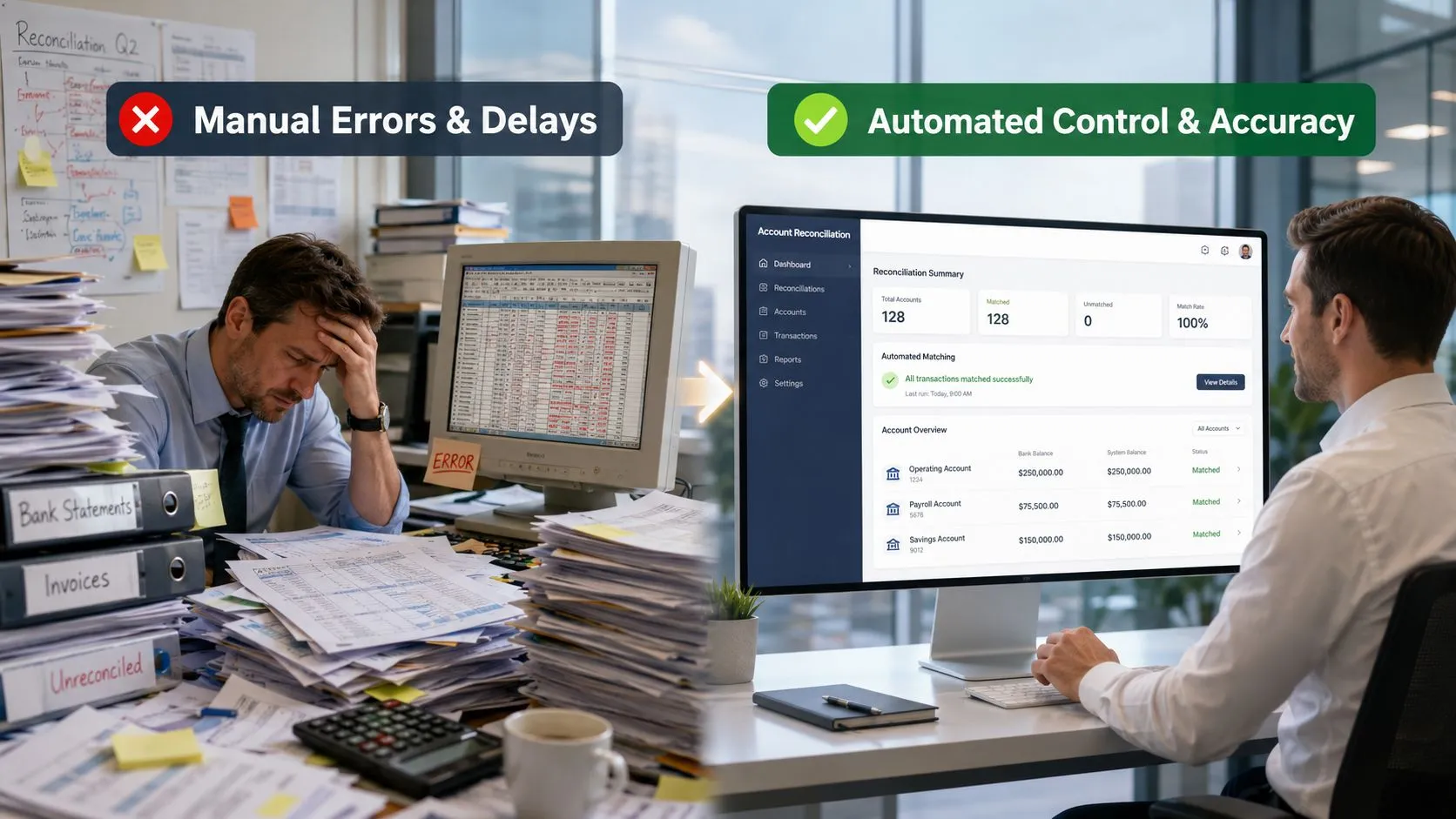
From spreadsheet governance to systems-based control
In Australia, the important shift has been from spreadsheet-led close work to automated workflows. Sage notes that businesses should generally reconcile at least monthly, and that modern reconciliation tools automate comparisons across bank statements, ledgers, invoices, and related records while creating an audit trail and routing exceptions for approval, which is why these tools have become foundational for accuracy and compliance in finance operations, as outlined in Sage’s overview of monthly reconciliation and reconciliation software.
That matters because spreadsheets are records, not controls. They can document that someone did the work. They don’t reliably enforce who reviewed it, what changed, whether the source data was complete, or how an exception moved from discovery to sign-off.
A good reconciliation platform does four things consistently:
- Ingests data from source systems, including your ERP, banks, cards, and payment tools.
- Matches transactions and balances, using rules that reflect your business logic.
- Separates routine items from exceptions, so staff spend time where judgement is needed.
- Maintains evidence, including timestamps, comments, approvals, and supporting documents.
What it looks like in practice
Think of a spreadsheet as a logbook. It records what someone wrote down. Account reconciliation software is closer to a flight data recorder. It captures what happened, when it happened, and who acted on it.
That distinction becomes material during audit, internal review, or a tough month-end. If a bank clearing account hasn’t washed through, or an intercompany balance won’t eliminate, you need to see the exception path quickly. You don’t want finance staff rebuilding the history from workbook tabs and inboxes.
Practical rule: If your reconciliation process depends on one or two experienced people knowing where the hidden checks sit, it isn’t robust enough.
Core Features That Shorten Your Month-End Close
The features that matter most aren’t the flashy ones. They’re the ones that remove repetitive work, isolate exceptions early, and stop unresolved items from drifting into the final days of close.
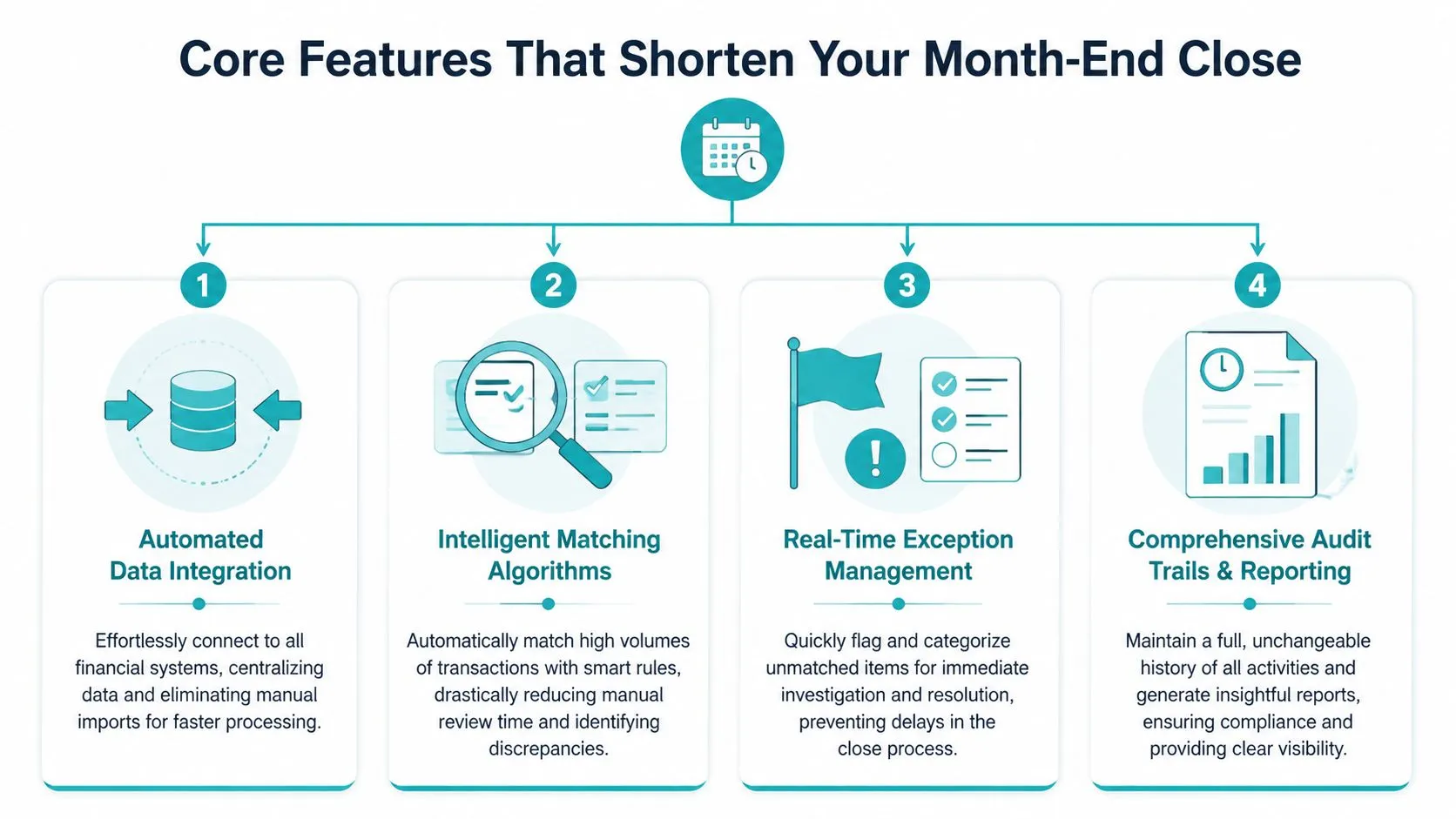
Automated integration and high-volume matching
If data still arrives through CSV uploads and manual reformatting, you haven’t solved reconciliation. You’ve just shifted where the manual work sits. The software needs reliable feeds from banks, ERP ledgers, subledgers, card platforms, and payment systems.
That requirement is more urgent now because transaction complexity is increasing. The Reserve Bank of Australia reports that NPP payments reached 3.9 billion in 2024, up 20% year on year, a sign of just how fast near-real-time payment activity is growing and why finance teams need tools that can handle high-volume, multi-source reconciliation, as highlighted in this discussion of payment complexity and reconciliation pressure.
For an ANZ business, this often shows up in places like:
- Merchant settlements, where gross receipts, fees, chargebacks, and timing differences land separately.
- Payroll clearing, where wages, super, deductions, and bank files don’t always settle in one neat sequence.
- Intercompany flows, where one entity posts before another, or descriptions don’t align.
Exception workflows and audit evidence
A high auto-match rate sounds attractive, but it’s not the deciding factor. The critical operational test is what happens to the unmatched items. Can the software assign them? Can reviewers see ageing? Can someone attach evidence, post an explanation, and approve resolution without leaving the workflow?
That’s where stronger platforms separate themselves. BlackLine, Kyriba, and Zone & Co are often considered where businesses need more formal close governance, especially around balance sheet controls, cash visibility, and intercompany support. AP automation tools such as Medius, Zudello, and Lightyear can also improve reconciliation quality upstream by giving the ERP cleaner invoice and payment data.
A useful way to assess feature value is this:
| Capability | What good looks like | Business outcome |
|---|---|---|
| Data connectivity | Bank, ERP, and subledger feeds arrive reliably | Less manual preparation before close |
| Matching rules | Logic handles references, dates, tolerances, and many-to-one scenarios | Fewer routine items sent for manual review |
| Exception handling | Owners, comments, evidence, and approvals sit in one place | Faster issue resolution |
| Audit trail | Every action is timestamped and reviewable | Better support for audit and compliance |
Visibility for the CFO and finance manager
The best teams don’t wait until day four or five of close to discover bottlenecks. They monitor status in-flight. Dashboards and task visibility matter because they show which reconciliations are complete, which are overdue, and where exceptions are accumulating.
That visibility becomes especially useful when you’re running a core ERP with specialist tools around it. NetSuite might hold the ledger, ProSpend or Webexpenses may feed spend activity, Expensify or Coupa may affect coding and approvals, and card or payment platforms add another settlement stream. Reconciliation software should bring those movements together in a way the CFO can govern.
Aligning Reconciliation Software with Your ERP
Reconciliation software only works well when the ERP architecture around it is sound. If data definitions vary by entity, bank feeds are inconsistent, and subledgers don’t post cleanly, the matching engine won’t rescue the close. It will just expose how fragmented the process already is.
That’s why ERP alignment is the first serious design question for Australian and New Zealand businesses. The software has to fit the way your finance data moves through the organisation, not the way a demo database behaves.
The ERP must remain the source of truth
For Australian mid-market firms with multi-entity structures, the key issue isn’t marketing around auto-match performance. It’s whether the solution can handle integration burden, support exception workflows across systems, and cope with local compliance tasks as transaction data moves through the business, particularly as the ATO’s eInvoicing environment expands, which is why this overview of integration burden and reconciliation design is useful.
That point gets missed in many software evaluations. A reconciliation tool should not become a shadow ledger. Your ERP, whether Oracle NetSuite, Epicor Kinetic, or MYOB Acumatica, still needs to hold the authoritative financial record. The reconciliation layer should consume data, validate it, and help your team resolve issues without creating a second version of the books.
For example:
- A multi-entity wholesaler may need bank and clearing account reconciliations at entity level, while group finance needs consolidated visibility for reporting.
- A manufacturer with separate operating companies may need inventory and accrual reconciliations aligned to different cut-off rules, then mapped back into one close calendar.
- A services group using multiple operational systems may need invoice, payroll, and expense data normalised before reconciliation can work reliably.
Integration design is where projects succeed or stall
The practical work usually sits in data mapping, timing, ownership, and exception handling. Middleware often plays a central role here. Workato, Celigo, Boomi, and Jitterbit are commonly used to move data between ERP, banking, payroll, AP automation, and reporting layers. If you’re assessing the broader integration pattern, Zephony’s guide for ERP integration success is a useful reference for thinking through sequencing, architecture, and governance.
Bank connectivity deserves special attention in ANZ environments because settlement timing and file formats can vary more than expected. Finance teams should also review not just direct bank links but how the ERP handles posting, cash application, and exception visibility. For a practical example in this area, see OneKloudX’s perspective on ANZ bank feeds and ERP connectivity.
If reconciliation is failing, don’t start by blaming the matcher. Check whether source systems are posting complete, timely, and consistent data.
OneKloudX works in this part of the stack with Oracle NetSuite, Epicor Kinetic, MYOB Acumatica, and connected tools such as BlackLine and Celigo, where the main objective is to keep the ERP authoritative while reducing manual close work around it.
How to Select the Right Software Solution
Software selection goes wrong when the shortlist is built around feature brochures. A CFO should assess reconciliation tools the same way they assess any finance platform decision, by looking at fit across process, architecture, and operating model.
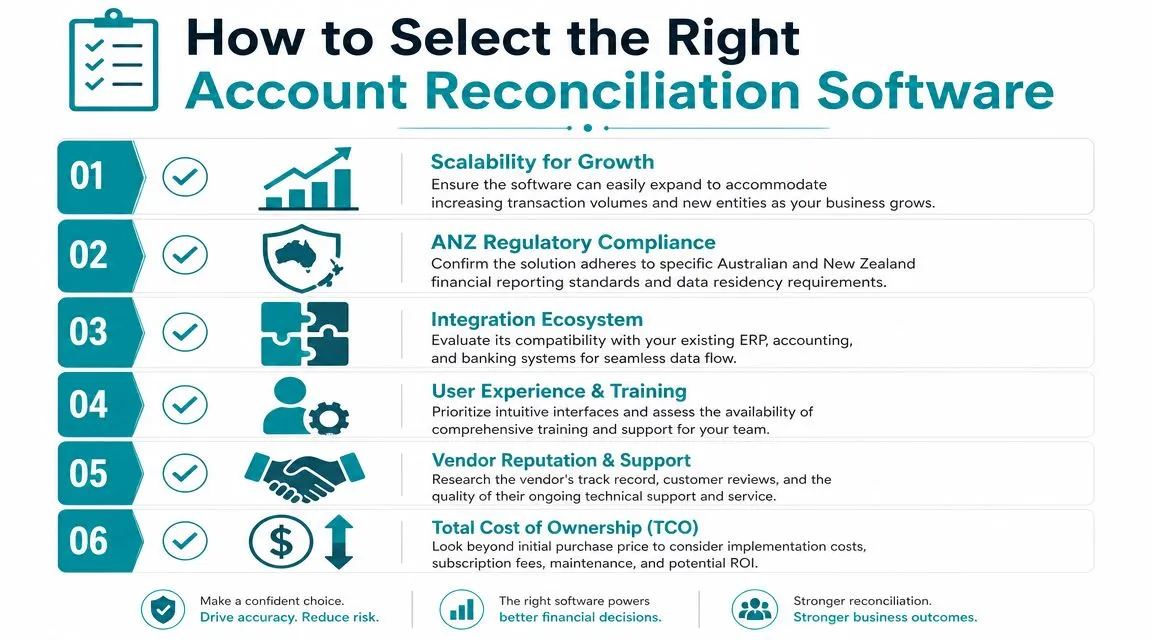
Start with your actual close pain
Don’t begin with a generic RFP. Begin with your late reconciliations, recurring exceptions, unsupported balances, and accounts that consume disproportionate team time.
A sensible evaluation usually includes these questions:
- Where does close slow down first, cash, merchant settlements, intercompany, payroll clearing, AP accruals, or something else?
- Which systems feed those accounts, ERP only, or ERP plus payroll, expense, banking, ecommerce, and AP tools?
- Who resolves the exception, and is that work visible today?
If you run KeyPay for payroll, ProSpend for spend control, or ELMO for workforce processes that influence finance data, the software must fit those operational realities. Generic “ERP integration” language isn’t enough.
Judge exception handling before matching claims
A polished demo will usually show fast matching. Ask to see what happens when references are wrong, dates are offset, fees are split, journals are posted late, or one side of an intercompany transaction hasn’t landed yet.
Use a short selection lens like this:
| Selection lens | What to look for |
|---|---|
| Technical fit | ERP integration depth, bank connectivity, support for adjacent systems |
| Functional fit | Intercompany, balance sheet, payment and clearing account complexity |
| Control fit | Approval routing, evidence retention, reviewer visibility |
| Partner fit | Local implementation capability, training, support, and finance process understanding |
Think beyond the buying team
The best choice on paper can still fail in rollout if the users don’t trust the workflows. Accountants need to see how the tool will reduce rework, not just generate another task queue. Controllers need confidence that sign-off and supporting evidence are stronger than what they have today. Auditors need a clean trail.
The right product is the one that fits your close design. The wrong product is the one that forces your team to invent workarounds from day one.
Calculating the ROI of Reconciliation Automation
The business case is usually stronger than finance teams first assume, but only if you build it from your own close process rather than vendor slogans.
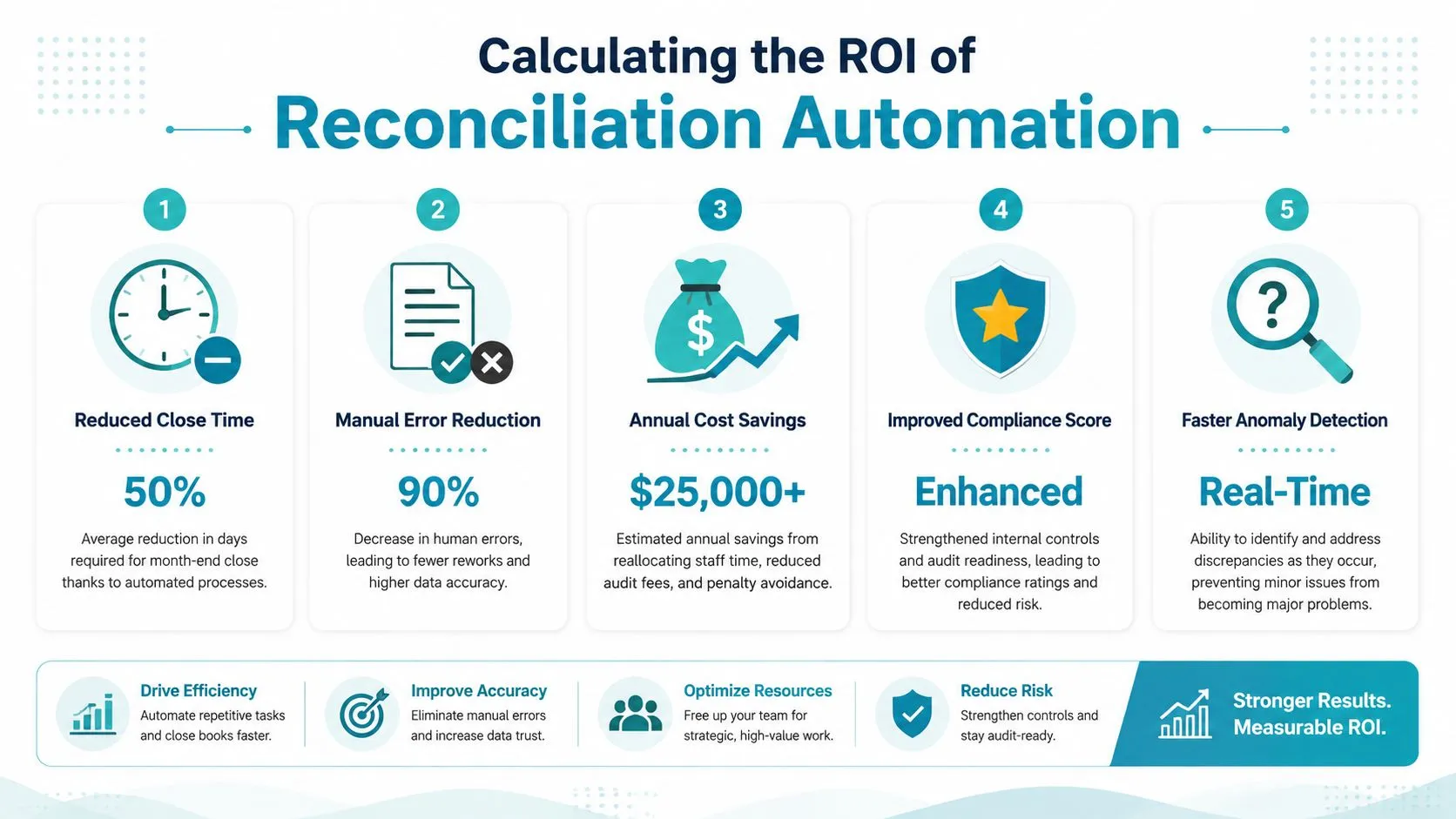
A practical starting point is time. Spendesk reports that finance teams using accounting automation can save up to four days on month-end close, and notes projected market growth and vendor claims that AI can automate a large proportion of reconciliation work. Those figures are best treated as directional when building your own case, but they show why reconciliation has become a material finance investment area, as outlined in Spendesk’s article on account reconciliation software and month-end savings.
Build the case from three buckets
The strongest ROI models combine labour efficiency, risk reduction, and decision-making benefits.
-
Labour saved during close
Measure how many people touch reconciliations today, which accounts consume the most time, and how much effort goes into chasing support, rework, and approvals. -
Error and remediation cost avoided
Look at what late or weak reconciliations trigger downstream. Journal rework, audit queries, unsupported balances, delayed reporting packs, and management time all carry a cost. -
Capacity shifted into analysis
This is harder to quantify neatly, but it matters. When qualified finance staff stop spending days matching routine items, they can review margins, working capital, forecast movements, and entity performance earlier.
This is also where wider reporting value comes into view. If your team is trying to improve board reporting and close transparency at the same time, the ERP reporting layer matters alongside reconciliation. A connected approach to financial reporting software and finance visibility can make the payoff more visible to executives.
Here’s a simple internal worksheet many CFOs use:
-
Current-state effort
Hours spent on reconciliations, investigation, review, and follow-up each month. -
Future-state effort
Expected hours once routine matching, assignments, and audit evidence are systemised. -
Implementation and run cost
Subscription, integration, internal project time, and ongoing admin. -
Risk and timing benefit
Faster sign-off, cleaner audit support, earlier management reporting.
A short explainer can help frame that discussion with the team:
Avoid common ROI mistakes
The weakest business cases make two errors. First, they count only headcount reduction, even though many finance teams aren’t trying to cut staff. They’re trying to stop skilled people spending their week on low-value manual work.
Second, they ignore implementation realities. If upstream data is inconsistent, the return will arrive more slowly. A realistic model should include process cleanup and integration work, not pretend the software lands into a perfect environment.
Implementation and Driving User Adoption
Most reconciliation projects fail for ordinary reasons. The data isn’t clean enough, ownership is vague, too many accounts go live at once, and users are told the software will “automate everything” when it clearly won’t. Adoption falls away quickly after that.
A better implementation starts with process design. Decide which reconciliations need standard rules, which need reviewer judgement, what evidence must be attached, and who approves exceptions. Then configure the system around those decisions.
Roll out in phases
Start with accounts that are painful, repetitive, and visible. Cash, cards, merchant settlements, payroll clearing, and selected balance sheet reconciliations are usually better starting points than trying to redesign every account at once.
A phased rollout often works like this:
-
Phase one: stabilise data feeds
Confirm bank, ERP, and subledger inputs are complete and consistently coded. -
Phase two: configure high-impact workflows
Set up matching rules, exception routing, reviewer roles, and evidence requirements. -
Phase three: expand by account family
Add intercompany, accruals, and more judgement-heavy reconciliations after the operating rhythm is working.
Train to the process, not just the clicks
User training should be tied to new responsibilities. Preparers need to know what qualifies as a valid explanation. Reviewers need to know when to reject, escalate, or request supporting evidence. Managers need visibility into ageing exceptions and overdue approvals.
This is also where data discipline matters. If descriptions, supplier names, account mappings, and entity references are inconsistent, users will lose confidence in the system quickly. Good adoption depends on stronger master data and transaction hygiene, which is why finance teams should address data cleansing and standardisation before automation.
Good implementations don’t ask users to trust the tool blindly. They show users exactly how the new workflow reduces ambiguity and protects sign-off quality.
Make process ownership explicit
Every reconciliation needs an owner, a reviewer, a due date, and a clear rule for unresolved items. That sounds obvious, but many projects stop at software configuration and never finish the operating model.
Teams that do this well usually document:
- Which accounts are in scope
- What supporting evidence is required
- When exceptions must be escalated
- Who can approve write-offs, adjustments, or timing differences
- How the close calendar changes after automation
The technology is only an enabler. The operating discipline around it is what shortens close and improves confidence in the numbers.
If your finance team is still carrying month-end through spreadsheets, email approvals, and manual bank matching, it may be time to redesign the close around stronger workflows and cleaner ERP integration. OneKloudX works with Australian and New Zealand organisations to align finance processes, ERP platforms, and connected tools so reconciliation automation delivers control as well as speed.