Have you seen the notification in your NetSuite account
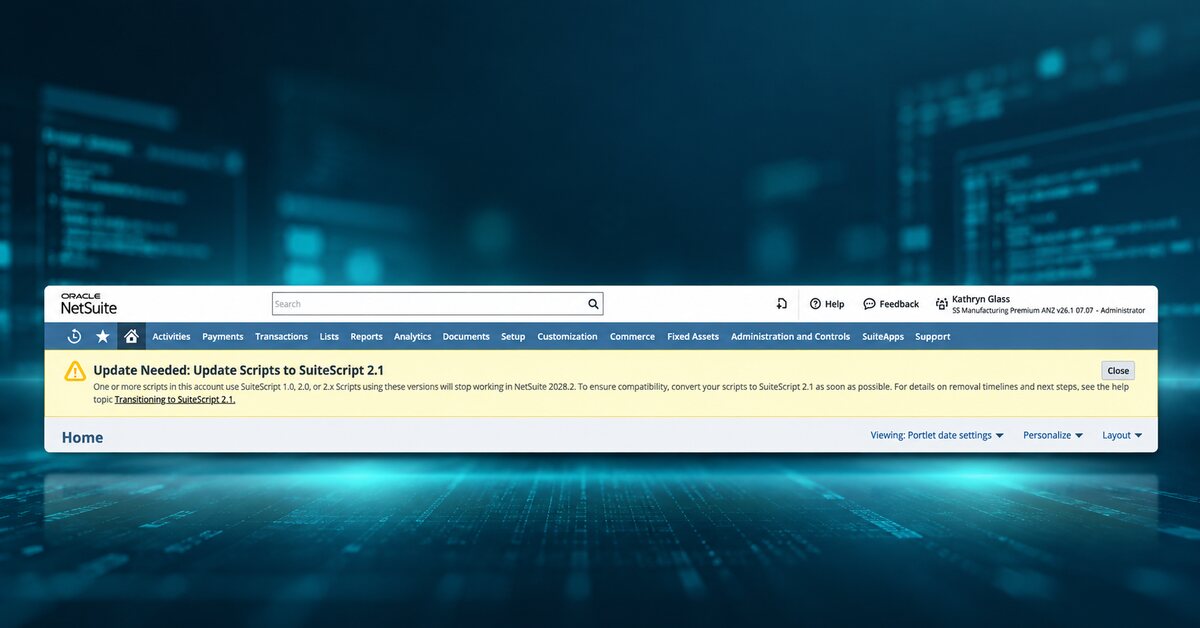
Update Needed: Update Scripts to SuiteScript 2.1 is now appearing in NetSuite accounts. The notification warns that scripts using SuiteScript 1.0, 2.0 or the 2.x annotation will need to move to SuiteScript 2.1 to remain compatible.
For many organisations, that raises an immediate question: which of our scripts are affected?
Custom scripts often operate quietly behind approvals, transaction processing, integrations, scheduled jobs and other day-to-day processes. Some may have been written years ago by an internal developer, a former implementation partner or another specialist. You may know what a script does without knowing which SuiteScript version it uses.
The deadline is not tomorrow, but the work should start with visibility now. Oracle’s current transition guidance says SuiteScript 2.1 became the standard scripting model in NetSuite 2026.2, with all new and existing scripts required to use SuiteScript 2.1 by NetSuite 2028.2.
What is SuiteScript 2.1
SuiteScript is NetSuite’s scripting framework. It allows businesses to extend and automate NetSuite when standard functionality does not fully meet a requirement. Scripts can support record updates, approvals, scheduled processes, integrations, custom pages and other business processes.
SuiteScript 2.1 is the current scripting model. It uses a newer JavaScript standard and a modular development approach. For existing customers, the practical issue is whether older scripts will continue to behave correctly as NetSuite completes the transition to 2.1.
When do NetSuite customers need to act
Oracle is phasing in the change across several NetSuite releases rather than applying a single immediate cut-off.
| NetSuite release | What it means |
|---|---|
| 2026.2 | SuiteScript 2.1 becomes the standard scripting model for new and existing scripts. |
| 2027.1 | SuiteScript 1.0 enters end-of-life support, covering critical issues only. |
| 2028.1 | SuiteScript 1.0 scripts can no longer be deployed in new accounts. SuiteScript 2.0 and 2.x scripts run as SuiteScript 2.1 by default. |
| 2028.2 | All new and existing scripts must use SuiteScript 2.1. Legacy script versions will no longer run. |
The practical takeaway: do not wait until the final release to discover that a business-critical process depends on a legacy script.
Which scripts should you review
Start by identifying scripts using:
- SuiteScript 1.0
- SuiteScript 2.0
- The @NApiVersion 2.0 annotation
- The @NApiVersion 2.x annotation
A typical account may contain User Event, Client, Scheduled, Map/Reduce, Suitelet, RESTlet and Workflow Action scripts, as well as custom modules and scripts supporting integrations. The first stage is an inventory of the scripting environment, not a mass conversion exercise.
It is also worth identifying scripts that are inactive, obsolete, duplicated or no longer required. Oracle recommends considering whether those scripts should be retired instead of migrated.
Do all older scripts need to be rewritten
No. The amount of work depends on the script and its current version.
For SuiteScript 2.0 and 2.x server scripts, NetSuite provides account-level preferences that allow customers to test scripts using the SuiteScript 2.1 runtime before updating the version annotation. A script that behaves correctly during testing may need a relatively straightforward version update. If it does not, the underlying code must be changed before migration.
SuiteScript 1.0 is generally more involved because it uses older global APIs and a different structure. Moving to 2.1 can require changes to modules, entry points, dependencies, searches, record operations and execution contexts. Some SuiteScript 1.0 APIs do not have a direct 2.1 equivalent, so a different technical approach may be required.
Why testing matters
The main risk is not only that a script fails to upload or execute. A converted script could run and still change the outcome of a business process.
Testing should cover the process supported by the script, including:
- transaction processing and calculations
- approvals and record updates
- integrations with other systems
- scheduled and automated processes
- roles, permissions and execution contexts
- execution logs, error handling and expected outputs
Oracle recommends testing before deployment, comparing the SuiteScript 2.1 behaviour with the original script and moving scripts in manageable groups rather than changing everything at once.
A practical SuiteScript 2.1 migration approach
- Inventory Identify scripts, versions, deployments and the business processes they support.
- Review Confirm which scripts are still required and which can be retired or consolidated.
- Prioritise Start with business-critical, high-use scripts and integrations with complex dependencies.
- Test Use the available 2.1 runtime testing options for eligible SuiteScript 2.0 and 2.x server scripts.
- Convert Update scripts that require technical changes, including legacy SuiteScript 1.0 scripts.
- Validate Check the updated code, then test the actual business process in a suitable environment.
- Roll out Deploy in phases and monitor execution, performance and errors before moving to the next group.
Use the migration to simplify your NetSuite account
A SuiteScript 2.1 review is also an opportunity to assess the wider health of your NetSuite customisation. Some scripts may solve problems that no longer exist. Others may duplicate standard NetSuite functionality or overlap with newer workflows, integrations or customisations.
Before converting a script, ask:
- Do we still need this script?
- Could standard NetSuite functionality now replace it?
- Can multiple scripts be consolidated?
- Is the current customisation creating unnecessary complexity?
The goal is not to preserve every line of legacy code. It is to keep the business process working while making the NetSuite environment easier to support and maintain.
Start with a fixed-price SuiteScript readiness assessment
If you have seen the notification and are unsure what it means for your account, OneKloudX can complete an initial SuiteScript 2.1 readiness assessment for $750 ex GST.
The assessment will:
- identify the scripts affected by the SuiteScript 2.1 transition
- confirm which scripts are already compliant
- flag scripts that require testing, conversion or further technical review
- identify scripts that may be candidates for retirement
- provide a clear action plan for what should happen next
Any remediation, conversion or script updates identified through the assessment will be scoped and quoted separately. This keeps the first step focused: understand the exposure, set priorities and make an informed plan.
Have you seen the SuiteScript 2.1 notification in your NetSuite account?
Talk to the OneKloudX Australia team about a fixed-price SuiteScript 2.1 readiness assessment for $750 ex GST.
Frequently asked questions
Is SuiteScript 2.1 now the standard version?
Yes. Oracle states that SuiteScript 2.1 is now the standard scripting model for new and existing NetSuite customisations.
When does SuiteScript 1.0 reach end-of-life support?
Oracle’s transition timeline places SuiteScript 1.0 into end-of-life support in NetSuite 2027.1, with support covering critical issues only.
Do SuiteScript 2.0 scripts need to be rewritten?
Not necessarily. Eligible 2.0 and 2.x server scripts can be tested in the 2.1 runtime. Scripts that do not behave correctly may require code changes.
How do I know which SuiteScript version a script uses?
NetSuite script records can be filtered by version, and script files include a SuiteScript version annotation.
Can SuiteScript 1.0 be converted to SuiteScript 2.1?
Yes, but the conversion can require structural and API changes because the two versions use different development models.
Can AI convert NetSuite scripts to SuiteScript 2.1?
AI-assisted tools can support analysis and conversion, but the resulting code still requires technical review and functional testing in the affected business process.
Should every legacy script be converted?
No. Inactive, obsolete or duplicated scripts may be better retired, and some customisations may now be replaceable with standard NetSuite functionality.