

Disconnected CRM and ERP systems create duplicate work, delayed handoffs, and unreliable forecasting. For businesses running Salesforce and NetSuite as separate platforms, those three problems compound every day, across every deal, across every team that touches the customer lifecycle. A well-built integration removes that friction across the entire lead-to-cash cycle, and the impact is felt immediately by the people closest to the work.
Let’s be direct about what it is actually costing: running Salesforce and NetSuite without connecting them is not a minor inconvenience. It is a structural problem that quietly drains revenue, slows your sales cycles, and forces your best people to spend their days re-entering data between platforms instead of focusing on work that actually grows your business.
The fix is not a workaround, a shared spreadsheet, or a weekly reconciliation meeting between Sales and Finance. The fix is a properly engineered, bi-directional integration that connects your CRM and ERP into a single, intelligent system, and it changes the way your business operates from the moment it goes live.
This guide walks you through exactly what a Salesforce and NetSuite integration delivers, how it works, who it is built for, and what to look for in a partner who can implement it correctly.
The Problem Nobody Talks About at Board Level
Most leadership teams know that Salesforce and NetSuite are siloed. What they often underestimate is how much that silo is actually costing them, and how deeply the three consequences of that disconnect, duplicate work, delayed handoffs, and unreliable forecasting, are embedded in day-to-day operations.
Think about what happens when your sales team closes a deal today. The opportunity is marked won in Salesforce. Someone from sales, or maybe from operations, then manually creates a sales order in NetSuite. A project is set up. A customer record is either found or re-created from scratch. Estimates are built in one system and emailed across to be entered into another. If anything changes on the Salesforce side, someone has to go back and update NetSuite manually. And if the deal falls through? The NetSuite records have to be closed off separately, assuming anyone remembers.
Every one of those manual steps is a point of failure. Data entered twice is data that will eventually be entered incorrectly. The handoff from CRM to ERP is a moment of delay and risk every single time it happens manually. And because the two systems never fully agree on the same numbers, financial forecasting is always working from a compromise rather than a single source of truth. According to research from PwC, 30 to 40 per cent of processing time across key finance functions can be eliminated through automation. For a business running both Salesforce and NetSuite without connecting them, a significant portion of that recoverable time is sitting in the gap between the two systems.
What a Bi-Directional Integration Actually Means
The phrase “systems integration” gets used loosely. It is worth being precise about what a well-built Salesforce and NetSuite integration actually does, because the difference between a superficial connector and a properly engineered solution is significant.
A bi-directional integration means data flows both ways, automatically, based on triggers that mirror your actual business process. It is not a one-time data export. It is not a nightly batch sync with a 24-hour lag. It is a live, intelligent connection that responds to what is happening in your business in near real-time.
Here is what that looks like in practice.
When a sales opportunity in Salesforce reaches a defined stage, the integration automatically creates the corresponding customer record, project, and sales order in NetSuite, without anyone touching a keyboard. When project estimates are approved in NetSuite Planning and Budgeting (NSPB), those financial figures flow back into the Salesforce forecasting fields, giving your sales leaders visibility over the numbers without needing to log into a second system. When an opportunity is marked Closed Won, the NetSuite sales order is approved and the project is updated automatically. When a deal is marked Closed Lost, the NetSuite project is closed and the sales order is cancelled, keeping your ERP clean without manual intervention.
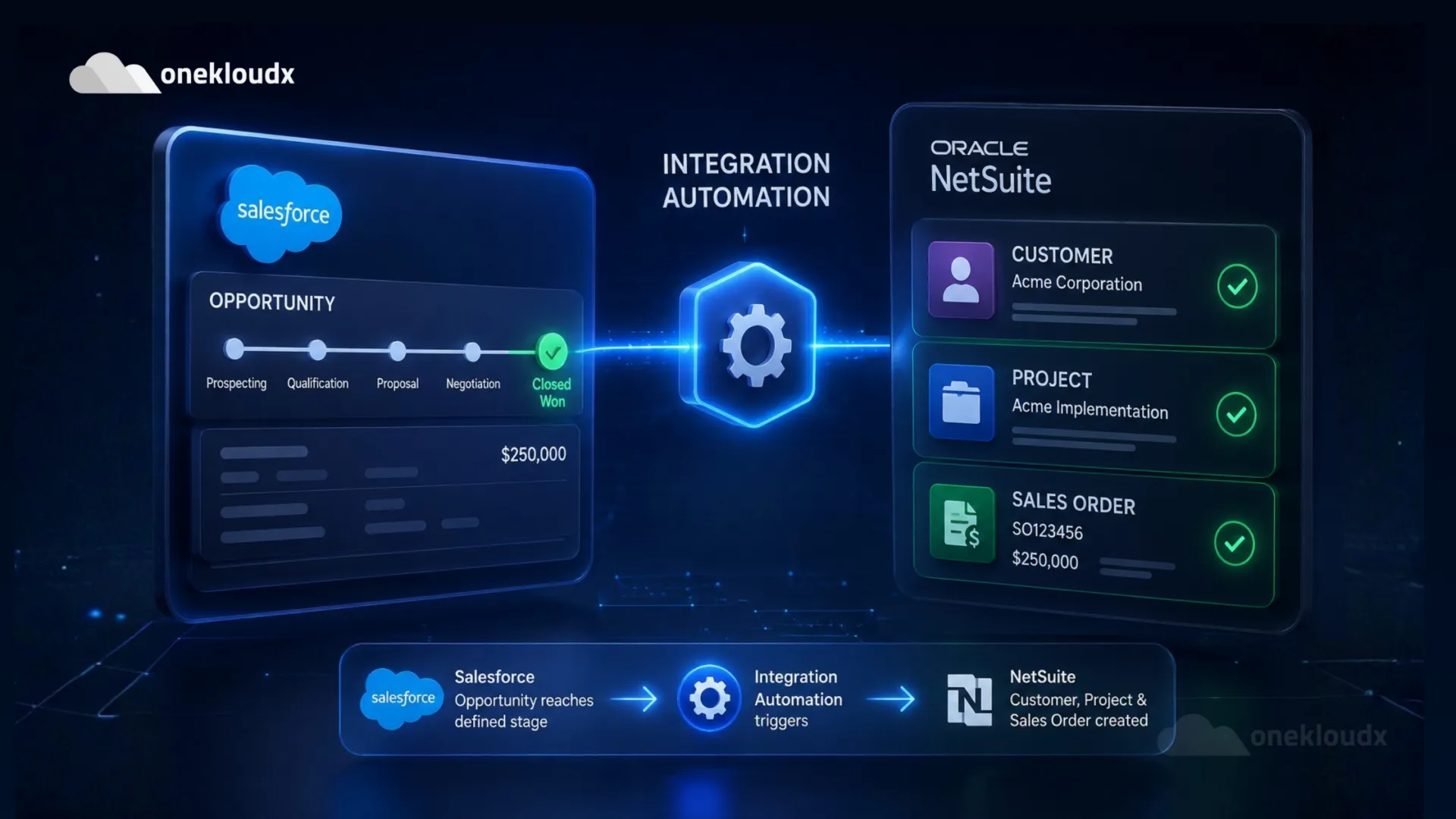
This is not automation for the sake of automation. It is the removal of an entire category of administrative work that currently sits between your CRM and your ERP, and the elimination of the errors, delays, and frustration that come with it.
The Business Impact Across Every Team
One of the things that makes a CRM-ERP integration compelling is that its benefits are not confined to one department. Every team that touches the customer lifecycle feels the difference.
Sales Teams
Sales people work in Salesforce. That is where their pipeline lives, where their forecasts are built, and where their attention sits. When those team members have to leave Salesforce to check order status, invoice history, or project progress in NetSuite, it breaks their flow and introduces delay into customer conversations. A connected system means sales reps can see the full financial picture of an account, including outstanding invoices, active projects, and revenue history, without switching platforms. They close faster because they have better information, and they spend less time chasing the Finance team for updates.
Finance and Operations Teams
Finance teams gain something just as valuable: trust in the data. When a sales order in NetSuite is automatically created the moment an opportunity is won in Salesforce, there is no lag, no missing information, and no need to chase the sales team for deal details. Revenue forecasting becomes more reliable because the pipeline data from Salesforce is feeding directly into the financial model in NetSuite, in real time. Month-end processes that previously involved reconciling two sets of records become significantly simpler when both systems have been in continuous sync throughout the month.
Project Managers
For businesses running project-based delivery, the integration delivers an immediate improvement to project kick-off speed. When the Salesforce opportunity is won, the project is created in NetSuite automatically and the relevant project manager is notified. There is no waiting for the handoff email. There is no risk of a project starting without the correct financial structure in place. The work begins faster, and it begins with the right information already in the system.
How the Integration Is Built: A Plain-Language Technical Overview

Understanding the mechanics behind a well-built integration helps you ask the right questions when evaluating a partner. You do not need to understand the code, but you should understand the approach.
The OneKloudX Salesforce and NetSuite integration is built using NetSuite RESTlet scripts, which are custom server-side scripts that run inside NetSuite and handle the logic for initiating and receiving data. These RESTlets are configured to pull data from Salesforce and push updates back, operating on a scheduled basis that can be set from every 15 minutes through to daily, depending on your business requirements.
The integration runs on a trigger-based model, meaning it responds to specific status changes in Salesforce rather than syncing everything indiscriminately. This approach keeps the data flow clean, reduces unnecessary API calls, and ensures that only meaningful business events, such as an opportunity changing stage, drive activity in NetSuite.
Error handling is built in from the ground up. Every sync attempt is logged within NetSuite, failed attempts are captured and emailed to nominated administrators, and custom saved searches are available to give your team visibility over which records have been synced, when, and with what outcome. If something goes wrong, you know about it immediately and you have the information needed to resolve it.
This is not a pre-packaged connector that works until one platform releases an update and silently breaks. It is a custom-built integration engineered around your specific business logic, tested thoroughly in a sandbox environment before it touches your live data, and supported by a local team after go-live.
What This Integration Is Designed to Solve
Before any integration project begins, it is worth being specific about the problems it resolves. The duplicate work, delayed handoffs, and unreliable forecasting that characterise a disconnected CRM and ERP environment each trace back to specific process gaps. Here is what a well-built Salesforce and NetSuite integration directly eliminates across the full lead-to-cash cycle.
– Dual data entry between CRM and ERP.
Customer records, opportunity details, and project information no longer need to be re-entered in NetSuite after they are created or updated in Salesforce. The integration handles that transfer automatically.
– Delayed project kick-off after a deal is won.
Project Managers no longer wait for a manual handoff. The project exists in NetSuite the moment the opportunity is won in Salesforce, and the relevant team is notified.
– Stale financial forecasts in the CRM.
When project estimates are approved in NSPB, those figures are written back to Salesforce automatically, keeping your CRM forecasting fields accurate without manual updates.
– Orphaned records after deals fall through.
When an opportunity is lost, the corresponding NetSuite project is closed and the sales order is cancelled automatically. Your ERP stays clean without requiring someone to manage the administrative fallout of a lost deal.
– No visibility across the lead-to-cash cycle.
With both systems connected, leadership has a complete view from the first Salesforce opportunity through to the NetSuite sales order, project delivery, and financial close, in a single connected workflow.
Who This Integration Is Built For
Not every business running both Salesforce and NetSuite will need a custom integration of this depth. But for the following profiles, it is not optional, it is a competitive necessity.

Professional services firms
where the sales-to-project handoff is a daily, high-volume process. If your business wins engagements in Salesforce and delivers them in NetSuite, the gap between those two systems is creating friction and risk every single day.
Sales-driven businesses with a complex quote-to-cash cycle.
If your deals involve estimates, project scoping, and revenue recognition, the integrity of your financial data depends on your CRM and ERP staying in sync throughout that cycle, not just at the beginning and end.

Finance and Operations teams using NSPB.
If your business has invested in NetSuite Planning and Budgeting, sending approved estimates back into Salesforce forecasting fields closes a loop that is otherwise managed manually, and usually inaccurately.

Businesses preparing to scale
Manual processes between CRM and ERP that are manageable at 50 deals a year become unworkable at 200. Building the integration before the volume arrives means your operational infrastructure scales with your growth rather than constraining it.
The Questions to Ask Before You Choose an Integration Partner
An integration between two enterprise platforms carries real risk if it is not done well. A poorly built connector can corrupt data, break silently after a platform update, or create compliance issues that are expensive to unwind. The partner you choose matters as much as the technology.
Here are the questions worth asking any integration specialist before you engage them.
Do you build custom integrations or implement pre-packaged connectors?
Pre-packaged connectors can work for simple use cases, but they rarely accommodate the specific business logic that makes your operation unique. Ask specifically whether the solution will be engineered to your workflows.
How do you handle errors and sync failures?
A good integration surfaces problems immediately. Ask how failed sync attempts are logged, who is notified, and what the resolution process looks like.
Do you test in a sandbox environment before going live?
Any integration touching financial data should be thoroughly tested in a non-production environment before it is deployed. This is non-negotiable.
What does post-go-live support look like?
Platform updates from both Salesforce and NetSuite can affect integrations. Ask whether ongoing support is included and how version compatibility is managed over time.
Where is your team based?
For Australian businesses, having a locally based integration team matters when something needs to be resolved quickly. Time zone alignment and an understanding of local compliance requirements are practical considerations, not just nice-to-haves.
Why OneKloudX
OneKloudX is a certified NetSuite partner and integration specialist based in Australia, with a track record of building and supporting custom CRM-to-ERP integrations for mid-market and enterprise clients across the region.
Our Salesforce and NetSuite integration is not a generic connector. It is engineered using NetSuite RESTlet scripts, built around your specific business logic, tested in a sandbox before deployment, and backed by an Australian support team that is available after go-live. We configure the trigger points, the sync frequency, the error handling, and the notification workflows to match the way your business actually operates, not the way a pre-packaged template assumes it does.
We begin every engagement with a discovery process that maps your current CRM-to-ERP workflow, identifies the specific points where data is being duplicated or lost, and defines the exact integration architecture before a line of code is written. By the time we go live, there are no surprises.
Frequently Asked Questions
Ready to Close the Gap Between Salesforce and NetSuite?
The distance between your CRM and your ERP is costing you time, accuracy, and revenue. The integration to close it is not a complex, months-long project. With the right partner, it is a structured, well-tested engagement that delivers measurable operational improvement from day one of going live.
Talk to the OneKloudX integration team and let’s map out exactly what a Salesforce and NetSuite integration looks like for your business.